Monday, December 2, 2019


While performing clone action, You may get the below error whenever RMAN failed in between.

It is because of spfile of auxiliary database.


IF YOU FACE THE ERROR IN RMAN DUPLICATE
RMAN-00571: ===========================================================
RMAN-00569: =============== ERROR MESSAGE STACK FOLLOWS ===============
RMAN-00571: ===========================================================
RMAN-03002: failure of Duplicate Db command at 03/26/2013 12:28:20
RMAN-05501: aborting duplication of target database
RMAN-05520: database name mismatch, auxiliary instance has PROD, command specified EKKDB

RMAN> exit

Rman leaves modified auxiliary spfile parameters if DUPLICATE fails [ID 1283344.1]

SOLUTION :  Shut down database
  Rename SPFILE
  check DBNAME in PFILE
  If, RAC then put # in front of spfile parameter
  Bring up database in nomount state using PFILE

* create pfile from spfile
* replace or remove spfile;
* edit pfile and update db_name
* create spfile from pfile;


RAC DUPLICATE DEMO SCRIPT
Changes in Pfile

FOR DATAFILES
db_create_online_dest_1='+DATA'
log_archive_dest_1='location=+FRA'

FOR REDO LOGS
*.log_file_name_convert=(/prddb/d20/proddata/,+EKKDATA/redo/,/prddb/d21/proddata/,+EKKFRA/redo/)

export ORACLE_SID=TEST
rman TARGET sys/xxxxxx@PROD CATALOG rman/xxxxxx@rman
connect auxiliary /

Tuesday, September 10, 2019


When ever RMAN takes backup it associate DB_UNIQUE_NAME with it.
If a backup file is not associated with any database, then the row describing it in the recovery catalog, shows null for the SITE_KEY column. By default, RMAN associates files with the target database where SITE_KEY is NULL.

Once you have cataloged the backup in the target database, then that backup is associated with the target database

In a Data Guard environment, you can offload the process of backing up control files, datafiles, and archived logs to the standby system.  By doing this you minimize the effect of backups on the primary system.  The backups taken in this way can be used to recover the primary or the standby database.

The standby database is a physical standby database, and backups are taken only on the standby database.

When you use the CONFIGURE command in conjunction with the FOR DB_UNIQUE_NAME option, then RMAN sets the CONFIGURE for the site-specific database, based on the DB_UNIQUE_NAME that was specified.

Following points are necessary  :
  • Standby database is physical standby database and backups are only taken from standby database.
  • An RMAN recovery catalog is required so backup from standby can be restored to primary database.
  • We must use spfile.
  • DB_RECOVERY_FILE_DEST_SIZE and DB_RECOVERY_FILE_DEST must be configured.
  • Flashback database must be on.

***You are not required to register standby database in recovery catalog. Oracle will understand that this is standby database (even though they share same dbid)


[oracle@PRIMARY admin]$ rman
Recovery Manager: Release 11.2.0.3.0 - Production on Thu Feb 27 01:57:43 2014
Copyright (c) 1982, 2011, Oracle and/or its affiliates.  All rights reserved.
RMAN> connect target /
connected to target database: PRIM (DBID=4131750714)
RMAN> connect catalog recomanager/rman@cata
connected to recovery catalog database
RMAN> register database ;
database registered in recovery catalog
starting full resync of recovery catalog
full resync complete

NOTE : we can not register standby database in same because standby and primary database dbid is same.
[oracle@STANDY admin]$ rman
Recovery Manager: Release 11.2.0.3.0 - Production on Thu Feb 27 01:56:01 2014
Copyright (c) 1982, 2011, Oracle and/or its affiliates.  All rights reserved.
RMAN> connect target /
connected to target database: PRIM (DBID=4131750714)
RMAN> connect catalog recomanager/rman@cata
connected to recovery catalog database
RMAN> register database ;
RMAN-00571: ===========================================================
RMAN-00569: =============== ERROR MESSAGE STACK FOLLOWS ===============
RMAN-00571: ===========================================================
RMAN-03002: failure of register command at 02/27/2014 01:56:39
RMAN-01005: Mounted control file type must be CURRENT to register the database

We need to configure following parameter on primary server :
RMAN> CONFIGURE RETENTION POLICY TO RECOVERY WINDOW OF 15 days ;
new RMAN configuration parameters:
CONFIGURE RETENTION POLICY TO RECOVERY WINDOW OF 15 DAYS;
new RMAN configuration parameters are successfully stored
starting full resync of recovery catalog
full resync complete

RMAN> CONFIGURE ARCHIVELOG DELETION POLICY TO APPLIED ON ALL STANDBY ;
new RMAN configuration parameters:
CONFIGURE ARCHIVELOG DELETION POLICY TO APPLIED ON ALL STANDBY;
new RMAN configuration parameters are successfully stored
starting full resync of recovery catalog
full resync complete

Configure the connect string for the primary database and all standby databases, so that RMAN can connect remotely and perform re synchronization when the RESYNC CATALOG FROM DB_UNIQUE_NAME command is used. When you connect to the target instance, you must provide a net service name.

RMAN>  CONFIGURE DB_UNIQUE_NAME 'STANDBY' CONNECT IDENTIFIER 'STANDBY' ;
new RMAN configuration parameters:
CONFIGURE DB_UNIQUE_NAME 'STANDBY' CONNECT IDENTIFIER  'STANDBY';
new RMAN configuration parameters are successfully stored
starting full resync of recovery catalog
full resync complete

RMAN> LIST DB_UNIQUE_NAME OF DATABASE;
List of Databases
DB Key  DB Name  DB ID            Database Role    Db_unique_name
------- ------- ----------------- ---------------  ------------------
517     PRIM     4131750714       PRIMARY          PRIM
517     PRIM     4131750714       STANDBY          STANDBY


We need to configure following parameter on standby  server :

RMAN> CONFIGURE BACKUP OPTIMIZATION ON ;
new RMAN configuration parameters:
CONFIGURE BACKUP OPTIMIZATION ON;
new RMAN configuration parameters are successfully stored
RMAN> CONFIGURE CONTROLFILE AUTOBACKUP ON ;
new RMAN configuration parameters:
CONFIGURE CONTROLFILE AUTOBACKUP ON;
new RMAN configuration parameters are successfully stored
RMAN> CONFIGURE CHANNEL DEVICE TYPE DISK FORMAT '/data/backup/%U' ;
new RMAN configuration parameters:
CONFIGURE CHANNEL DEVICE TYPE DISK FORMAT   '/data/backup/%U';
new RMAN configuration parameters are successfully stored


RMAN> connect target sys/mayank@prim
connected to target database: PRIM (DBID=4131750714)
RMAN> connect catalog recomanager/rman@cata
connected to recovery catalog database
RMAN> RESYNC CATALOG FROM DB_UNIQUE_NAME ALL ;
starting full resync of recovery catalog
full resync complete

resyncing from database with DB_UNIQUE_NAME STANDBY

Sunday, September 8, 2019


RMAN-05535: WARNING: All redo log files were not defined properly. ORACLE error from auxiliary database: ORA-19527: physical standby redo log must be renamed

When i am creating Standby database using RMAN active database option , it has thrown below Errors while creating online relogfiles .

ORACLE error from auxiliary database: ORA-19527: physical standby redo log must be renamed
ORA-00312: online log 1 thread 1: 'C:\ORACLE\ORADATA\DUMMY\REDO0101.LOG'

Solution

Use the log_file_name_convert option in RMAN duplicate command.

Ex:

RMAN>run
{
duplicate target database for standby from active database
spfile
set db_unique_name='dummy'
set control_files='M:\oracle\oradata\DUMMY\CONTROL01.CTL'
set log_file_name_convert='M:\oracle\oradata\DUMMY\',''M:\oracle\oradata\DUMMY\'
set instance_number='1'
nofilenamecheck;

}


Note: If you set the db_recovery_file_dest parameter RMAN will not give give above Error, By default online redo log files will be generated on db_recovery_file_dest parameter folder location .

ORA-16047: DGID mismatch between destination setting and target database


ORA-16047: DGID mismatch between destination setting and target database
ORA-16047: DGID
ORA-16047 


select dest_id,status,error from v$archive_dest;

DEST_ID  STATUS       ERROR
------  ------------- -----------------------------------------------------------------
1       VALID
2       DISABLED      ORA-16047: DGID mismatch between destination setting and target database


>>>>>>>>>>>>>>>>>>>>>>>>>>>>>>>>>>>>>This parameter should be the same on primary and standby <<<<<<<<<<<<<<<<<<<<<<<<<<<<<<<<<<<<
 
SQL> show parameter log_archive_config

NAME                                        TYPE         VALUE
------------------------------------ -----------  ------------------------------
log_archive_config                      string       dg_config=(PRIMARY,STANDBY)


LOG_ARCHIVE_CONFIG='DG_CONFIG=(PRIMARY,STANDBY)' ---  using the DB_UNIQUE_NAME of both databases

Saturday, September 7, 2019


Oracle Apps (ebiz) R2 Dataguard Setup
=========================

Business Continuity for Oracle E-Business Release 12 Using Oracle 11g (11gR1) Physical Standby Database (Doc ID 1545920.1)

https://oracle-base.com/articles/11g/data-guard-setup-11gr2

Thursday, June 20, 2019


To register manual backups

Suppose we have taken a backup of a particular datafile outside of RMAN through O/s commands. Whatever backup you take outside of RMAN, RMAN will not know about it and it will not consider this backup exist until we register the backup in RMAN catalog.
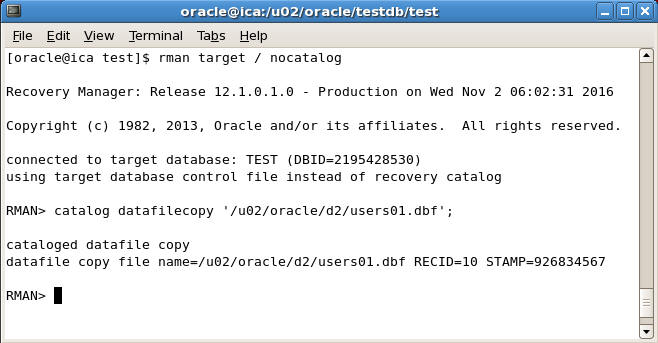
For example suppose we have taken a backup of users01.dbf datafile on /u02/oracle/d2/users01.dbf' directory and now we want to register this backup in RMAN repository
To register give the following command
RMAN> catalog datafilecopy '/u02/oracle/d2/users01.dbf';
 register manual backups in rman
Once you issue the above command then RMAN will enter the information about this backup in the catalog and will recover from it in future recovery operation if needed.

Crosscheck Command in RMAN

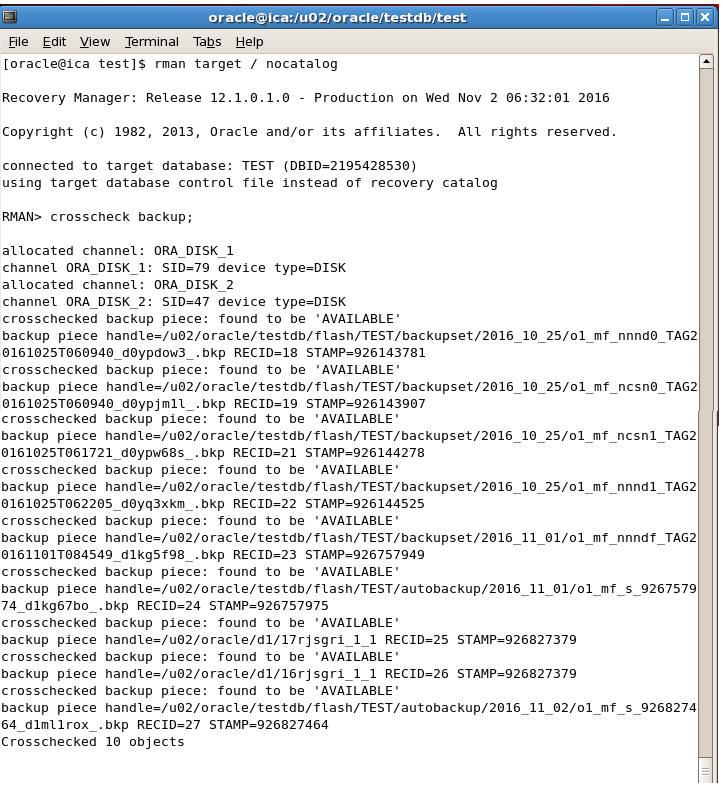
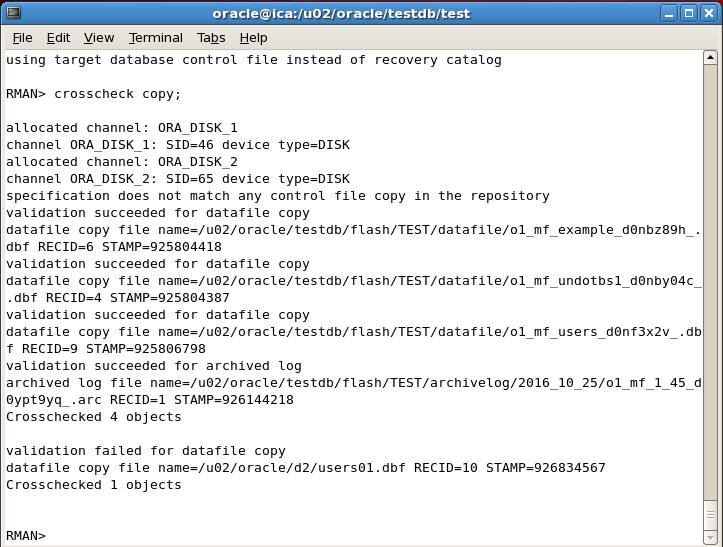
Crosscheck is a very useful command in RMAN which automatically checks all the backups whose information is store in the RMAN repository and whether they are available on the disk or not.
If a corresponding backup is not available on the disk then Crosscheck command marks the backup as Expired otherwise it marks it as Available
To check status of all backupsets we can give the following command
RMAN> crosscheck backup;
crosscheck backup
To check status of all image copies we can give the following command
RMAN> crosscheck copy;
crosscheck copy
To know the status of Expired and Available backupsets give the following command
RMAN> list expired backup;
list expired backup
To know the status unavailable image copy copy give the following command
RMAN> list expired copy;
list expired copy
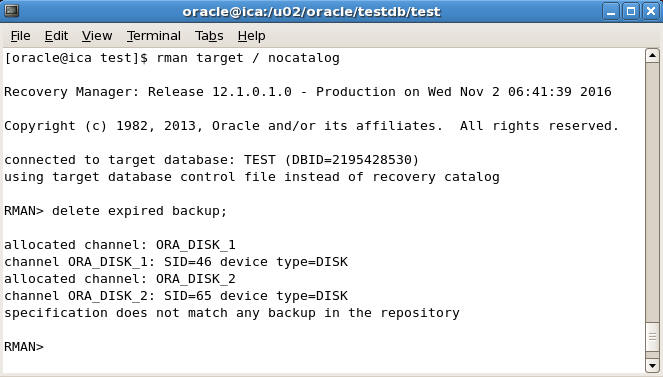
To delete the expired backup sets we can give the following command
RMAN> delete expired backup
delete expired backup
To delete the expired image copies we can give the following command
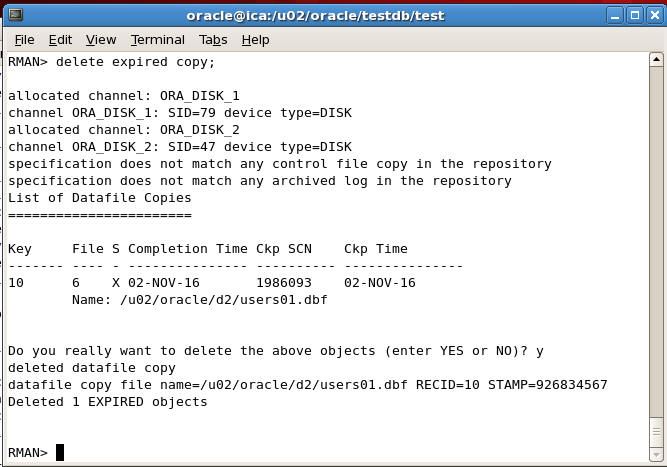
RMAN> delete expired copy;
delete expired copy


RMAN delete obsolete = ORA-19606: Cannot copy or restore to snapshot control file, RMAN-06214: Datafile Copy, etc…

PROBLEM

RMAN> delete obsolete;
RMAN retention policy will be applied to the command
RMAN retention policy is set to redundancy 2
allocated channel: ORA_DISK_1
channel ORA_DISK_1: SID=14 device type=DISK
Deleting the following obsolete backups and copies:
Type                 Key    Completion Time    Filename/Handle
-------------------- ------ ------------------ --------------------
Control File Copy     18660437 15-JUL-10          /oracle/product/11.2.0.2/dbs/snapcf_P10AC.f
Backup Set           18667103 19-JUL-10
  Backup Piece       18667105 19-JUL-10          /oraback/P10AC/autobackup/2010_07_19/o1_mf_s_724801673_64b73c6t_.bkp

Do you really want to delete the above objects (enter YES or NO)? YES
RMAN-00571: ===========================================================
RMAN-00569: =============== ERROR MESSAGE STACK FOLLOWS ===============
RMAN-00571: ===========================================================
RMAN-03009: failure of delete command on ORA_DISK_1 channel at 07/22/2010 14:44:43
ORA-19606: Cannot copy or restore to snapshot control file
Another common problem that can be solved the same way (if the easier “crosscheck controlfile copy” doesn’t work):
RMAN> delete noprompt obsolete;
using target database control file instead of recovery catalog
RMAN retention policy will be applied to the command
RMAN retention policy is set to redundancy 1
allocated channel: ORA_DISK_1
channel ORA_DISK_1: SID=4 device type=DISK
Deleting the following obsolete backups and copies:
Type                 Key    Completion Time    Filename/Handle
-------------------- ------ ------------------ --------------------
Control File Copy     2      03-JUN-13          /oracle/product/11.2.0.3/dbs/snapcf_P10VQA.f
RMAN-06207: WARNING: 1 objects could not be deleted for DISK channel(s) due
RMAN-06208:          to mismatched status.  Use CROSSCHECK command to fix status
RMAN-06210: List of Mismatched objects
RMAN-06211: ==========================
RMAN-06212:   Object Type   Filename/Handle
RMAN-06213: --------------- ---------------------------------------------------
RMAN-06214: Datafile Copy   /oracle/product/11.2.0.3/dbs/snapcf_P10VQA.f

SOLUTION

Not sure why this happens, but the solution is to configure a different snapshot controlfile name so that RMAN can use that, thus allowing you to remove the “old” one. Then configure back to what you had:
configure snapshot controlfile name to '/tmp/it.f';
crosscheck controlfilecopy '/oracle/product/11.2.0.4/dbs/snapcf_P30ATLIS.f';
delete noprompt expired controlfilecopy '/oracle/product/11.2.0.4/dbs/snapcf_P30ATLIS.f';
delete noprompt obsolete;
configure snapshot controlfile name to '/p-atlis/oracle/product/11.2.0.4/dbs/snapcf_P30ATLIS.f';
show all;

MISMATCHED DATAFILE COPY

This is another similar issue but with a different solution.
RMAN> delete noprompt obsolete;
RMAN retention policy will be applied to the command
RMAN retention policy is set to redundancy 3
using channel ORA_DISK_1
Deleting the following obsolete backups and copies:
Type Key Completion Time Filename/Handle
-------------------- ------ ------------------ --------------------
Control File Copy 4 11-NOV-11 /tmp/control00.ctl
RMAN-06207: WARNING: 1 objects could not be deleted for DISK channel(s) due
RMAN-06208: to mismatched status. Use CROSSCHECK command to fix status
RMAN-06210: List of Mismatched objects
RMAN-06211: ==========================
RMAN-06212: Object Type Filename/Handle
RMAN-06213: --------------- ---------------------------------------------------
RMAN-06214: Datafile Copy /tmp/control00.ctl
REPORT THIS AD

and the solution is:
RMAN> crosscheck copy;
RMAN> delete noprompt expired copy;

 RMAN Recovery Catalog About Recovery Catalog RMAN recovery catalog Is another database which is out of your normal databases or which is o...