Tuesday, March 27, 2018


Configure RMAN
=================

prerequisite : Enable Archive Logs.  Click here to see

1. CREATE TABLESAPCE FOR CATELOG

CREATE TABLESPACE TB_RMAN
DATAFILE '/rman/app/orarman/oradata/rman/rman01.dbf'
SIZE 100M AUTOEXTEND ON;


2. CREATE USER RMAN...

CREATE USER RMANPRODDB IDENTIFIED BY rmanproddb DEFAULT TABLESPACE TB_RMAN
TEMPORARY TABLESPACE TEMP
QUOTA UNLIMITED ON TB_RMAN;


SQL> grant RECOVERY_CATALOG_OWNER to rman;

Grant succeeded.


SQL> grant connect, resource to rman;

Grant succeeded.


3. CREATE THE CATALOG

[root@ebizstb Desktop]# su - oraebiz
[oraebiz@ebizstb ~]$ tnsping rman

TNS Ping Utility for Linux: Version 11.2.0.4.0 - Production on 10-MAR-2017 15:48:35

Copyright (c) 1997, 2013, Oracle.  All rights reserved.

Used parameter files:
/ebiz/ebizdb/tech_st/11.2.0/network/admin/PRODDB_ebiz/sqlnet_ifile.ora


Used TNSNAMES adapter to resolve the alias
Attempting to contact (DESCRIPTION = (ADDRESS_LIST = (ADDRESS = (PROTOCOL = TCP)(HOST = stb.expolanka.com)(PORT = 1525))) (CONNECT_DATA = (SERVICE_NAME = rman.expolanka.com)))
OK (40 msec)

[oraebiz@ebizstb ~]$ rman catalog rmanproddb/rmanproddb@rman

Recovery Manager: Release 11.2.0.4.0 - Production on Fri Mar 10 15:51:33 2017

Copyright (c) 1982, 2011, Oracle and/or its affiliates.  All rights reserved.

connected to recovery catalog database

RMAN> create catalog;     

recovery catalog created

RMAN> exit


Recovery Manager complete.
[oraebiz@ebizstb ~]$ rman target sys/erporacle321@proddb catalog rmanproddb/rmanproddb@rman

Recovery Manager: Release 11.2.0.4.0 - Production on Fri Mar 10 15:53:23 2017

Copyright (c) 1982, 2011, Oracle and/or its affiliates.  All rights reserved.

connected to target database: PRODDB (DBID=26011804)
connected to recovery catalog database

RMAN> register database;

database registered in recovery catalog
starting full resync of recovery catalog
full resync complete

5) Configuration of RMAN Parameters.

RMAN configuration parameters for database with db_unique_name VISDB are:
CONFIGURE RETENTION POLICY TO RECOVERY WINDOW OF 1 DAYS;
CONFIGURE BACKUP OPTIMIZATION ON;
CONFIGURE DEFAULT DEVICE TYPE TO DISK; # default
CONFIGURE CONTROLFILE AUTOBACKUP OFF; # default
CONFIGURE CONTROLFILE AUTOBACKUP FORMAT FOR DEVICE TYPE DISK TO '%F'; # default
CONFIGURE DEVICE TYPE DISK PARALLELISM 1 BACKUP TYPE TO BACKUPSET; # default
CONFIGURE DATAFILE BACKUP COPIES FOR DEVICE TYPE DISK TO 1; # default
CONFIGURE ARCHIVELOG BACKUP COPIES FOR DEVICE TYPE DISK TO 1; # default
CONFIGURE CHANNEL DEVICE TYPE DISK FORMAT   '/data/FRA_visdb/VISDB/rman_backup/full_%u_%s_%p';
CONFIGURE MAXSETSIZE TO UNLIMITED; # default
CONFIGURE ENCRYPTION FOR DATABASE OFF; # default
CONFIGURE ENCRYPTION ALGORITHM 'AES128'; # default
CONFIGURE COMPRESSION ALGORITHM 'BASIC' AS OF RELEASE 'DEFAULT' OPTIMIZE FOR LOAD TRUE ; # default
CONFIGURE ARCHIVELOG DELETION POLICY TO NONE; # default
CONFIGURE SNAPSHOT CONTROLFILE NAME TO '/u01/vis/visdb/tech_st/11.2.0/dbs/snapcf_VISDB.f'; # default


6) RMAN backup script

[root@vis Desktop]# cat /PRODBACKUP/rman/runrman.sh
dt=`date +%d%m%y`
logfile="Rman"$dt".log"

echo "Start RMAN Backup of Vis8070 Instance on `date` " 2>&1  >> /PRODBACKUP/rman/log/$logfile

su - oravis -c "rman target sys/erporacle321 catalog rmanvis/r@rman << EOF
RESYNC CATALOG;
#RECOVER COPY OF DATABASE WITH TAG 'OSS';
#BACKUP DEVICE TYPE DISK INCREMENTAL LEVEL 1 FOR RECOVER OF COPY WITH TAG 'OSS' DATABASE;
#BACKUP DEVICE TYPE DISK ARCHIVELOG ALL;
#BACKUP AS BACKUPSET DATABASE PLUS ARCHIVELOG;
#DELETE NOPROMPT OBSOLETE DEVICE TYPE DISK;
BACKUP AS COMPRESSED BACKUPSET INCREMENTAL LEVEL 0 DATABASE;
#BACKUP AS COMPRESSED BACKUPSET INCREMENTAL LEVEL 0 WITH TAG 'FULL_BACKUP' DATABASE;
DELETE NOPROMPT EXPIRED BACKUP;
DELETE NOPROMPT EXPIRED ARCHIVELOG ALL;
DELETE NOPROMPT OBSOLETE REDUNDANCY 1;
#DELETE NOPROMPT OBSOLETE;
#DELETE NOPROMPT ARCHIVELOG ALL;
EXIT;
EOF" 2>&1 >> /PRODBACKUP/rman/log/$logfile

echo "Complete RMAN Backup of Vis8070 on `date` " 2>&1  >> /PRODBACKUP/rman/log/$logfile

#sh /PRODBACKUP/rman/dump/dump.sh  2>&1 >> /PRODBACKUP/rman/log/$logfile

echo "End Backing up recovery catalog on `date` " 2>&1  >> /PRODBACKUP/rman/log/$logfile


cat /PRODBACKUP/rman/log/$logfile  2>&1 | mail -s "Vis8070 - Daily Online Backup" pramuditha@expolanka.com


Wednesday, March 21, 2018

Commands to check the Linux Version, Release name & Kernel version.
uname -a (Print all Information)
 image001_0.png
uname -r (Print the kernel name)
image003_0.png
cat /proc/version
image005_0.png
cat /etc/issue
image007_0.png
cat /etc/redhat-release
image009_0.png
lsb_release –a
image011_0.png
tail /etc/redhat-release
image013_0.png

Friday, March 16, 2018

Maintaining RMAN Backups

Whatever backups you take using RMAN, it store all the backup information in the database Control File and also in the Recovery Catalog if you are using RMAN with Catalog.
To maintain the information in up-to-date state we might need the following commands

To register manual backups

Suppose we have taken a backup of a particular datafile outside of RMAN through O/s commands. Whatever backup you take outside of RMAN, RMAN will not know about it and it will not consider this backup exist until we register the backup in RMAN catalog.
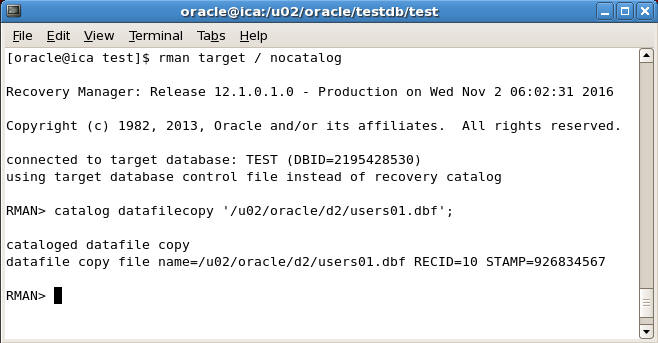
For example suppose we have taken a backup of users01.dbf datafile on /u02/oracle/d2/users01.dbf' directory and now we want to register this backup in RMAN repository
To register give the following command

RMAN> catalog datafilecopy '/u02/oracle/d2/users01.dbf';
 register manual backups in rman
Once you issue the above command then RMAN will enter the information about this backup in the catalog and will recover from it in future recovery operation if needed.

Crosscheck Command in RMAN

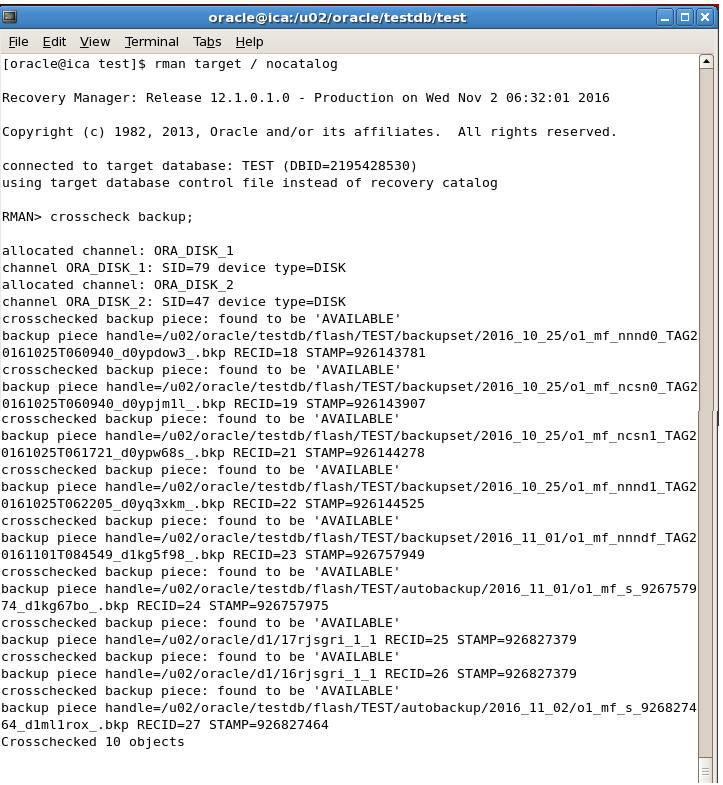
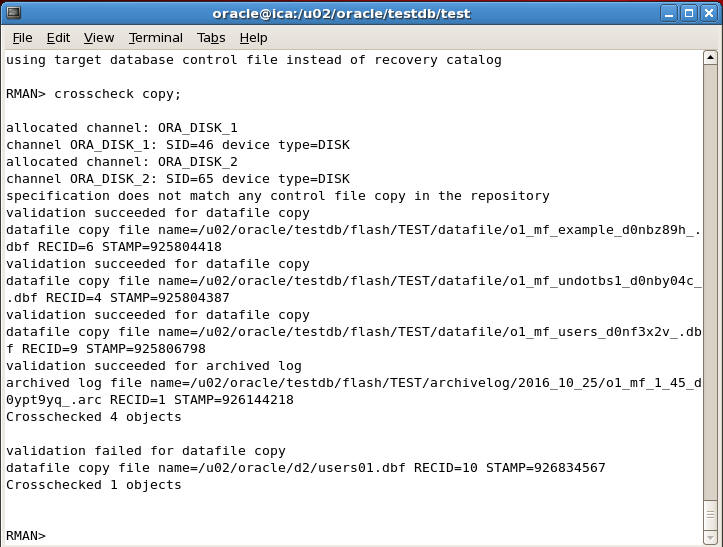
Crosscheck is a very useful command in RMAN which automatically checks all the backups whose information is store in the RMAN repository and whether they are available on the disk or not.
If a corresponding backup is not available on the disk then Crosscheck command marks the backup as Expired otherwise it marks it as Available


To check status of all backupsets we can give the following command
RMAN> crosscheck backup;
crosscheck backup

To check status of all image copies we can give the following command
RMAN> crosscheck copy;
crosscheck copy


To know the status of Expired and Available backupsets give the following command
RMAN> list expired backup;
list expired backup

To know the status unavailable image copy copy give the following command
RMAN> list expired copy;
list expired copy

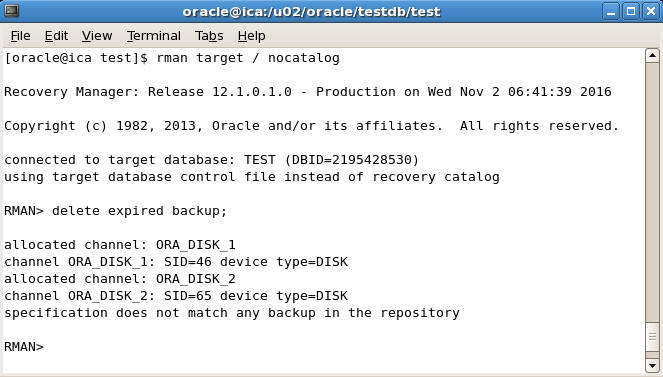
To delete the expired backup sets we can give the following command
RMAN> delete expired backup
delete expired backup


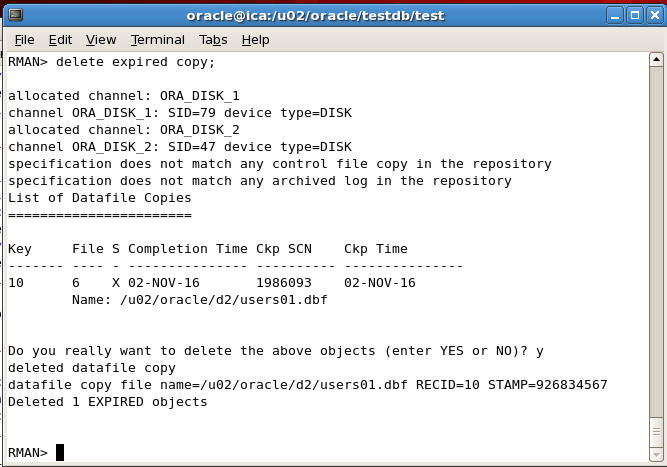
To delete the expired image copies we can give the following command
RMAN> delete expired copy;
delete expired copy

Tuesday, March 13, 2018


R12.2.x ADOP : [ERROR] ETCC not run in the database node DBHOSTNAME


[applvis@vis apps]$ adop phase=prepare

Enter the APPS password:
Enter the SYSTEM password:
Enter the WLSADMIN password:

Validating credentials.

Validating system setup.
    Node registry is valid.
    [ERROR]     ETCC not run in the database node vis
                The EBS Technology Codelevel Checker needs to be run on the database node.
                It is available as Patch 17537119.
    
    Encountered the above errors when performing database validations.
    Resolve the above errors and restart adop.


[STATEMENT] Please run adopscanlog utility, using the command

"adopscanlog -latest=yes"

to get the list of the log files along with snippet of the error message corresponding to each log file.


adop exiting with status = 1 (Fail)

[root@vis Desktop]# su - oravis

[oravis@vis ~]$ cd $ORACLE_HOME

[oravis@vis 11.2.0]$ mkdir -p etcc

[oravis@vis 11.2.0]$ mv p17537119_R12_GENERIC.zip etcc/

[oravis@vis 11.2.0]$ unzip etcc/p17537119_R12_GENERIC.zip 
[oravis@vis 11.2.0]$  sh etcc/checkDBpatch.sh


Now type

[applvis@vis apps]$ adop phase=prepare

adnodemgrctl.sh: check the logfile /u01/vis/visapps/apps/fs2/inst/apps/VISDB_vis/logs/appl/admin/log/adnodemgrctl.txt for more information ...


The prepare phase completed successfully.


adop exiting with status = 0 (Success)


Sunday, March 11, 2018


Oracle EBS 12.2 Cloning Document

Cloning Oracle E-Business Suite Release 12.2 with Rapid Clone (Doc ID 1383621.1)

Friday, February 23, 2018


How to see view script from SQL Prompt?


SQL> set long 5000 

SQL> select text from user_views 
         where view_name='VW_INBOX_PO_GENERATED' ;

Thursday, February 22, 2018


Remove Oracle table row lock

STEP 1:  To identify the SID for the table with the lock, you will use this system ID in a later query to get the serial number for the table row lock:

SQL> select * from dba_dml_locks;

SQL> select
   session_id
from
   dba_dml_locks
where
   name = 'EF_AP_BALANCE';

Output :
SID
___
607

STEP 2:  The next step is a script to find the Serial# for the table row lock :
SQL> select
   sid,
   serial#
from
   v$session
where
   sid in (
   select
      session_id
   from
      dba_dml_locks
   where
      name = 'F_AP_BALANCE');
Output :
SID SERIAL#
---- -------
607 1402

STEP 3:  Finally, we can use the "alter system" command to kill the session that is holding the table lock:
alter system kill session 'SID,SERIALl#';

SQL> alter system kill session '607,1402';

 RMAN Recovery Catalog About Recovery Catalog RMAN recovery catalog Is another database which is out of your normal databases or which is o...