Wednesday, November 1, 2017


How to find Oracle EBS Weblogic Server Admin Port Number and URL

Web Logic Server Admin Port  

 Method 1:

Open the EBS domain config file in following location.
$EBS_DOMAIN_HOME/config/config.xml

Then check for Admin Server Port.

Method 2:

Open the application tier context file
$CONTEXT_FILE

Then check the value of variable "s_wls_adminport" in the for the correct Web Logic Server Admin port number

Web Logic Server Console URL 

http://<server name>. <domain name> : < WLS Admin Port>/console
For example. http://oracle.test.com:7003/console

ORA-02020: Too Many Database Links In Use


PROBLEM:

While querying against a database link, got below error.

select sysdate from dual@DB5


ERROR at line 1:

ORA-02020: too many database links in use

CAUSE & SOLUTION:
open_links parameter control, the number of database links each session can use without closing it.
If you access a database link in a session, then the link remains open until you close the session.


SQL> show parameter open_link

NAME TYPE VALUE
------------------------------------ ----------- ------------------------------
open_links integer 4
open_links_per_instance integer 4


Here open_links is set to 4, i.e a session can access only 4 open database links in that session.When the open db_link connection reaches the limit(open_links), it throws ORA-02020: too many database links in use.
Solution:


1. Close the open db_link connections

2. Increase the open_links parameter (bounce required)


Let’s reproduce this error.


SQL> select sysdate from dual@DB1;


SYSDATE
---------
30-JUL-17


SQL> select sysdate from dual@DB2;

SYSDATE
---------
30-JUL-17

SQL> select sysdate from dual@DB3;

SYSDATE
---------
30-JUL-17

SQL> select sysdate from dual@DB4;

SYSDATE
---------
30-JUL-17

SQL> select sysdate from dual@DB5;


select sysdate from dual@DB5

ERROR at line 1:


ORA-02020: too many database links in use

Now we reached maximum open database link connections.


— View the open database link connection[Need to run this from same session ]

-- The table v$dblink populates data only for the current session,

SQL> select db_link,logged_on,open_cursors from v$dblink;

DB_LINK LOG OPEN_CURSORS
---------------- --- ------------

DB1 YES 0

DB2 YES 0

DB3 YES 0

DB4 YES 0


We can see there are 4 open database link transactions and it is matching the open_links parameter( i.e 4). So quick way to fix is to close these connections.

SQL> alter session close database link DB4;

ERROR:

ORA-02080: database link is in use

Now we are getting an ORA-02080 error. So before closing the database link, we need to either commit/rollback.

SQL> commit;

Commit complete.

SQL> alter session close database link DB4;

Session altered.

SQL> select db_link,logged_on,open_cursors from v$dblink;

SQL> select db_link,logged_on,open_cursors from v$dblink;


DB_LINK LOG OPEN_CURSORS
---------------- --- ------------

DB1 YES 0

DB2 YES 0

DB3 YES 0


SQL> select sysdate from dual@DB5;


SYSDATE
---------
30-JUL-17


Alternative solutions is:

Increase the open_links parameter.


alter system set open_links=8 scope=spfile;

shutdown immediate;

startup


Tuesday, October 31, 2017


Rfs: Possible Network Disconnect With Primary Database' In Standby Alert Log (Doc ID 397014.1)

In this Document

APPLIES TO:Oracle Database - Enterprise Edition - Version 9.0.1.0 to 12.1.0.2 [Release 9.0.1 to 12.1]
Information in this document applies to any platform.
***Checked for relevance on 31-AUG-2012***
***Checked for relevance on 8-Jul-2015***


SYMPTOMS

Standby alert log reports fallowing errors:

RFS: Possible network disconnect with primary database
Standby database ID mismatch [0xAAAA:0xBBBBB]

Archive log transfer/apply to this standby database works fine.

CAUSE

The (error) message may be triggered by another database that has log_archive_dest_X pointing to standby instance of (error) message .

The RFS process tries to communicate with the instance.
SOLUTION

Check if you have DB with mismatched database ID and its log_archive_dest_X parameter value.

If found a database, which is not included in the current in primary/standby configuration, disable log_archive_dest_2 to the instance:

ie:

From the error message of "Standby database ID mismatch [0xAAAA:0xBBBBB]"

Convert the hex number of first argument, 0xAAAA to decimal value using calculator

Then search db with the dbid.


SQL> select dbid from v$database;

SQL> alter system set log_archive_dest_state_x=disable;

Wednesday, October 18, 2017

Offline install of .NET Framework 3.5 in Windows 10 using DISM

Windows 10 comes with .NET framework 4.5 pre-installed, but many apps developed in Vista and Windows 7 era require the .NET framework v3.5 installed along with 4.5. These apps will not run unless you will install the required version. When you try to run any such app, Windows 10 will prompt you to download and install .NET framework 3.5 from the Internet. However, this will take a lot of time. You can save your time and install .NET Framework 3.5 from the Windows 10 installation media. This method is much faster and does not even require an Internet connection. Here is how to install it.

To install .NET Framework 3.5 in Windows 10, do the following:
  1. Insert your Windows 10 DVD, or double click its ISO image, or insert your bootable flash drive with Windows 10, depending on what you have.
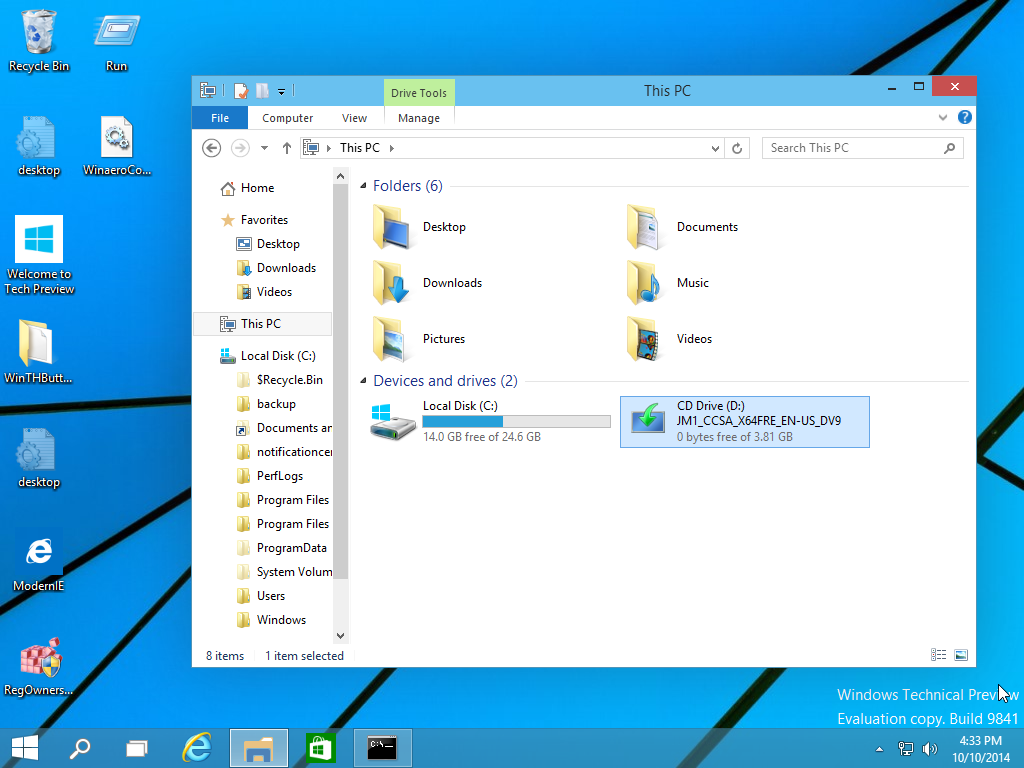
  2. Open 'This PC' in File Explorer and note the drive letter of the installation media you have inserted. In my case it is disk D:
    installation media drive d
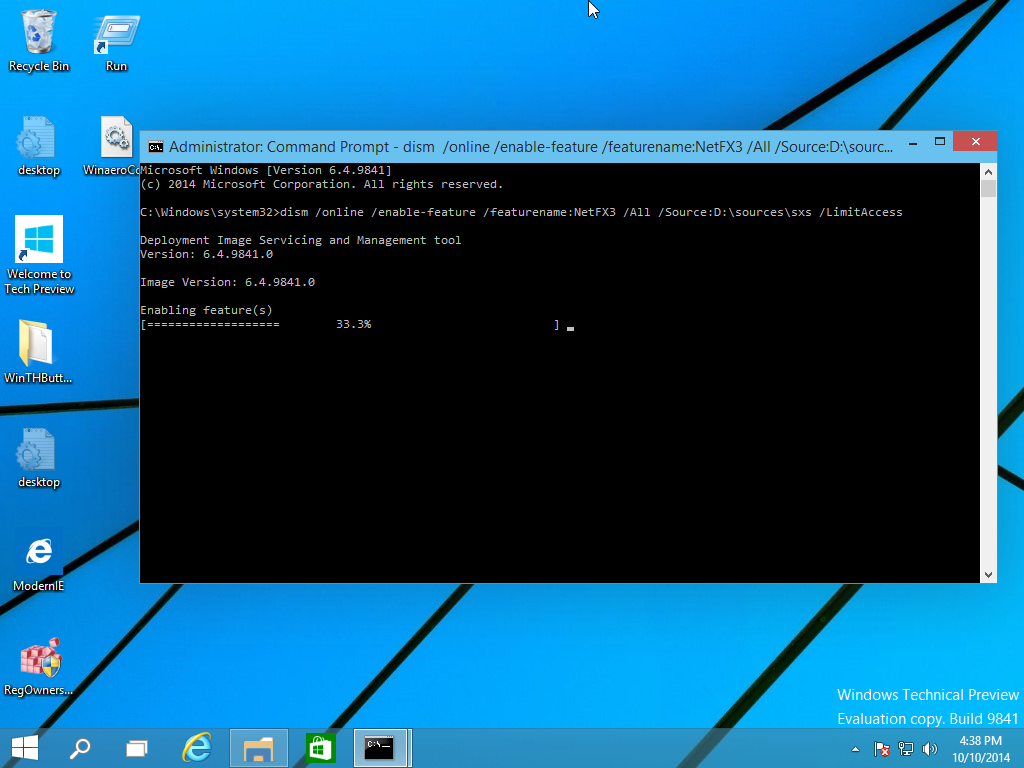
  3. Now open an elevated command prompt and type the following command:
    Dism /online /enable-feature /featurename:NetFX3 /All /Source:D:\sources\sxs /LimitAccess
    Replace D: with your drive letter for Windows 10 installation media.
    dism
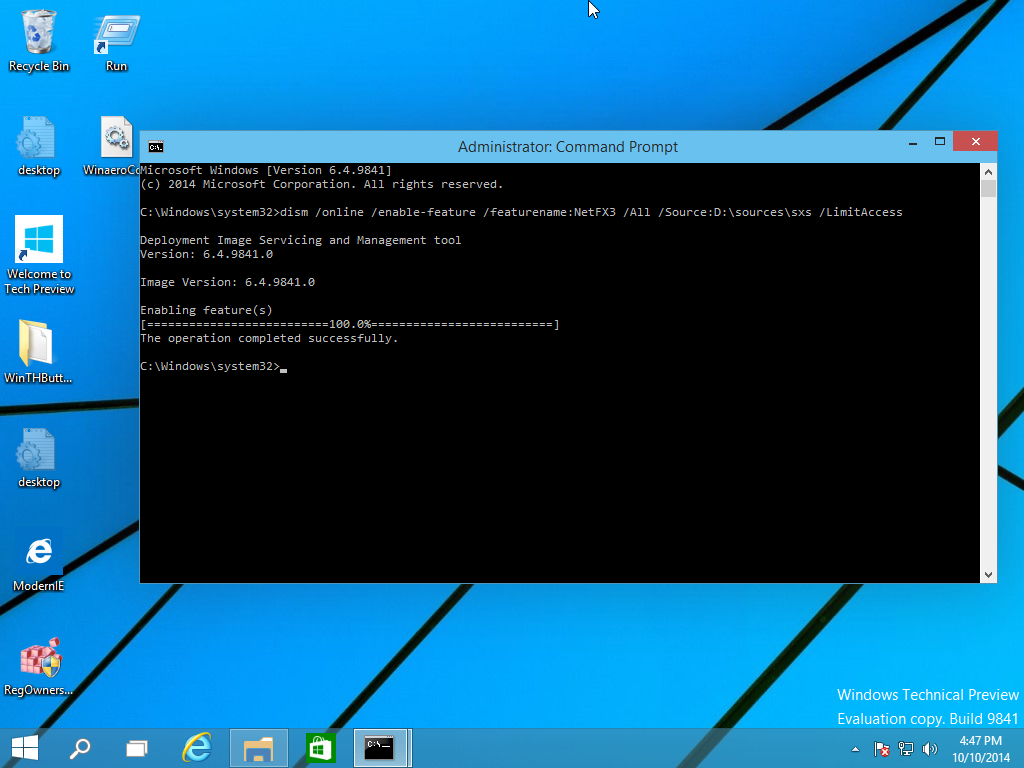
You are done! This will install .NET framework 3.5 in Windows 10.
net installed seccessfully
To save your time, I have prepared a simple batch file which will save your time and will find the inserted installation media automatically. It looks like this:
@echo off
Title .NET Framework 3.5 Offline Installer
for %%I in (D E F G H I J K L M N O P Q R S T U V W X Y Z) do if exist "%%I:\\sources\install.wim" set setupdrv=%%I
if defined setupdrv (
echo Found drive %setupdrv%
echo Installing .NET Framework 3.5...
Dism /online /enable-feature /featurename:NetFX3 /All /Source:%setupdrv%:\sources\sxs /LimitAccess
echo.
echo .NET Framework 3.5 should be installed
echo.
) else (
echo No installation media found!
echo Insert DVD or USB flash drive and run this file once again. 
echo.
)
pause
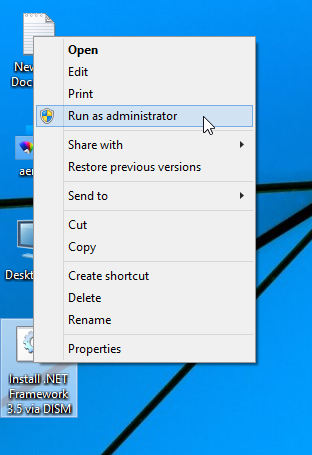
Download the file, extract it from the ZIP archive to the Desktop, right click it and choose Run as administrator. The file will install .NET Framework 3.5 automatically after finding the drive letter of your Windows 10 installation media.
run as administrator
Click here to download the batch file.

Monday, October 9, 2017


How To Run Diagnostic: Apps Check (OMCHECK) From A Financials Responsibility? (Doc ID 460813.1)
R11i/12: GL/AP/FA/AR/PM: 

GOAL

This diagnostic is used to locate the current versions of files you have running on your system.  This document will show you how to setup the Diagnostic: Apps Check (OMCHECK) request to be available in a Financials Responsibility.

SOLUTION

In order to be able to see and use Diagnostic: Apps Check from a Financials Responsibility (like FA, GL, AR, AP, PN, and so on) the following steps need to be performed:
1.  Responsibility:  System Administrator responsibility and go to Request Groups form:
Navigation:  Security > Responsibility > Request


2.  Query for Application: Application Name and Group: All Reports and Programs.
Application Name can be one of the following:  Assets, General Ledger, Receivables, Payables, Property Manager and so on.

3.  Add a new Program under Requests title and enter Diagnostics: Apps Check for the desired Name


4. Save work


Tuesday, October 3, 2017


ORA-00020: maximum number of processes (500) exceeded


How to increase PROCESSES initialization parameter:

1. Login as sysdba
sqlplus / as sysdba

or

sqlplus /nolog

SQL*Plus: Release 11.2.0.3.0 Production on Wed Oct 4 11:32:29 2017
Copyright (c) 1982, 2011, Oracle. All rights reserved.

SQL> connect sys/oracle as sysdba

Connected.

2. Check Current Setting of Parameters
sql> show parameter sessions
sql> show parameter processes
sql> show parameter transactions

3. If you are planning to increase "PROCESSES" parameter you should also plan to increase "sessions and "transactions" parameters
A basic formula for determining these parameter values is as follows:

processes=x
sessions=x*1.1+5
transactions=sessions*1.1

4. These paramters can't be modified in memory. You have to modify the spfile only (scope=spfile) and bounce the instance.
sql> alter system set processes=500 scope=spfile;
sql> alter system set sessions=555 scope=spfile;
sql> alter system set transactions=610 scope=spfile;
sql> shutdown abort
sql> startup

Thursday, September 28, 2017

Oracle / PLSQL: TO_DATE Function

This Oracle tutorial explains how to use the Oracle/PLSQL TO_DATE function with syntax and examples.

Description

The Oracle/PLSQL TO_DATE function converts a string to a date.

Syntax

The syntax for the TO_DATE function in Oracle/PLSQL is:
TO_DATE( string1 [, format_mask] [, nls_language] )

Parameters or Arguments

string1
The string that will be converted to a date.
format_mask
Optional. This is the format that will be used to convert string1 to a date. It can be one or a combination of the following values:
ParameterExplanation
YEARYear, spelled out
YYYY4-digit year
YYY
YY
Y
Last 3, 2, or 1 digit(s) of year.
IYY
IY
I
Last 3, 2, or 1 digit(s) of ISO year.
IYYY4-digit year based on the ISO standard
RRRRAccepts a 2-digit year and returns a 4-digit year.
A value between 0-49 will return a 20xx year.
A value between 50-99 will return a 19xx year.
QQuarter of year (1, 2, 3, 4; JAN-MAR = 1).
MMMonth (01-12; JAN = 01).
MONAbbreviated name of month.
MONTHName of month, padded with blanks to length of 9 characters.
RMRoman numeral month (I-XII; JAN = I).
WWWeek of year (1-53) where week 1 starts on the first day of the year and continues to the seventh day of the year.
WWeek of month (1-5) where week 1 starts on the first day of the month and ends on the seventh.
IWWeek of year (1-52 or 1-53) based on the ISO standard.
DDay of week (1-7).
DAYName of day.
DDDay of month (1-31).
DDDDay of year (1-366).
DYAbbreviated name of day.
JJulian day; the number of days since January 1, 4712 BC.
HHHour of day (1-12).
HH12Hour of day (1-12).
HH24Hour of day (0-23).
MIMinute (0-59).
SSSecond (0-59).
SSSSSSeconds past midnight (0-86399).
AM, A.M., PM, or P.M.Meridian indicator
AD or A.DAD indicator
BC or B.C.BC indicator
TZDDaylight savings information. For example, 'PST'
TZHTime zone hour.
TZMTime zone minute.
TZRTime zone region.
nls_language
Optional. This is the nls language used to convert string1 to a date.

Returns

The TO_DATE function returns a date value.

Applies To

The TO_DATE function can be used in the following versions of Oracle/PLSQL:
  • Oracle 12c, Oracle 11g, Oracle 10g, Oracle 9i, Oracle 8i

Example

Let's look at some Oracle TO_DATE function examples and explore how to use the TO_DATE function in Oracle/PLSQL.
For example:
TO_DATE('2003/07/09', 'yyyy/mm/dd')
Result: date value of July 9, 2003

TO_DATE('070903', 'MMDDYY')
Result: date value of July 9, 2003

TO_DATE('20020315', 'yyyymmdd')
Result: date value of Mar 15, 2002
You could use the TO_DATE function with the dual table as follows:
SELECT TO_DATE('2015/05/15 8:30:25', 'YYYY/MM/DD HH:MI:SS')
FROM dual;
This would convert the string value of 2015/05/15 8:30:25 to a date value

 RMAN Recovery Catalog About Recovery Catalog RMAN recovery catalog Is another database which is out of your normal databases or which is o...